
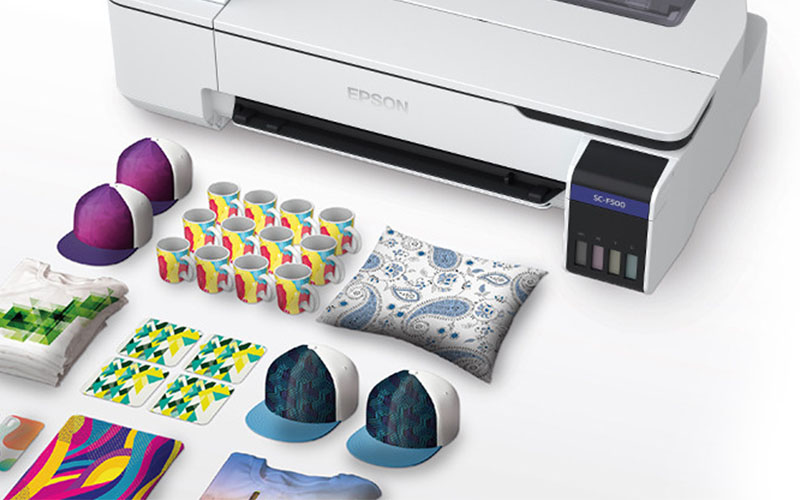
Sublimation printers are popular tools for making custom products. Many people use them to create t-shirts, mugs, phone cases, banners, and other personalized items. But what exactly does a sublimation printer do? In simple terms, it prints designs using special ink that turns into gas when heated and bonds permanently with certain materials. This article explains everything step by step in easy words. You will learn how the printer works, what you can make with it, its good and bad points, costs, and who should buy one. By the end, you will have clear facts to decide if this technology fits your needs.
What Is Sublimation Printing?
Sublimation printing is a method that uses heat to transfer designs onto items. The process starts with special sublimation ink printed onto transfer paper. When you apply high heat and pressure, the ink turns from a solid into a gas. This gas then enters the surface of the material and becomes part of it. The result is a smooth, vibrant image that does not peel or crack like regular stickers.
The word “sublimation” comes from science, where a solid changes directly into gas without becoming liquid first. That is exactly what happens with the ink inside the printer and during the heat press step. Because the ink goes into the material, the colors look bright and the feel stays soft, especially on fabrics.
Sublimation works best on materials that have a polyester coating or are made mostly of polyester. This includes polyester t-shirts, mouse pads, ceramic mugs with a special coating, metal panels, and some plastics. It does not work well on pure cotton or dark-colored items without extra steps.
How Does a Sublimation Printer Work?
A sublimation printer looks a lot like a regular inkjet printer you might have at home or in the office. The main difference is the ink and the paper it uses.
You create your design on a computer using simple software. The printer then sprays tiny drops of sublimation ink onto special transfer paper. The ink sits on top of the paper and dries quickly.
Next, you cut out the design if needed and place the printed paper face down onto your blank product. You put everything into a heat press or oven. The machine heats up to around 350-400 degrees Fahrenheit for a set time, usually 30 to 60 seconds for shirts or longer for mugs.
During heating, the ink turns into gas and travels into the polyester fibers or coating. When the item cools, the gas turns back into a solid and locks the color inside the material. The transfer paper is peeled away, and you are left with a permanent, full-color design.
The printer itself does not use heat. It works at normal room temperature like any inkjet. The magic happens later in the heat press step.
Types of Sublimation Printers
Most sublimation printers are based on Epson inkjet technology. Epson models are popular because their print heads handle the special ink well and produce sharp details.
Entry-level sublimation printers are often converted from standard Epson desktop printers like the L1800 or ET series. These are smaller, slower, and good for beginners or small shops that make only a few items per day.
Larger dedicated dye sublimation printers use industrial print heads. They print faster and handle wider rolls of paper or fabric. These machines suit bigger businesses that need to produce hundreds of shirts or banners every day.
Some printers come ready for sublimation right out of the box with special firmware and continuous ink systems. Others need conversion kits that replace the original inks with sublimation inks and add larger ink tanks.
You can also find all-in-one bundles that include the printer, inks, paper, and sometimes a small heat press.
What Can You Make with a Sublimation Printer?
Sublimation printers open up many creative and business possibilities. Here are some common products:
- Apparel: t-shirts, hoodies, sports jerseys, socks, and hats (as long as they have enough polyester)
- Drinkware: mugs, tumblers, water bottles, and glassware with polyester coating
- Home goods: pillows, blankets, curtains, and wall art
- Promotional items: mouse pads, keychains, badges, and phone cases
- Signs and banners: flags, yard signs, and large fabric displays
- Personalized gifts: photo panels, ornaments, and custom puzzles
The big advantage is that you get full-color, photo-quality prints that feel part of the product. There is no thick layer of ink or vinyl sitting on top. Colors stay bright even after many washes.
Advantages of Using a Sublimation Printer
One of the best things about sublimation is the quality. Prints look professional with smooth gradients and sharp text. The design becomes part of the material, so it does not fade, crack, or peel easily.
It is great for small runs or one-of-a-kind items. You do not need screens or plates like traditional screen printing, so setup is fast and cheap.
Waste is low because you only print what you need. The process is clean and does not use messy inks or chemicals during application.
Sublimation works well for light-colored items and gives excellent white areas since the ink is transparent until heated. Many users combine it with other methods like DTF for dark garments.
Disadvantages and Limitations
Sublimation is not perfect for every job. It only works on polyester or items with a polymer coating. Pure cotton shirts will not accept the ink properly without a special coating, and even then results can be lighter.
You cannot print on dark fabrics effectively because the ink is translucent. The design would disappear or look washed out. For dark items, other methods like DTF are usually better.
The heat press step requires extra equipment and space. You need consistent heat and pressure for good results, which takes some practice to master.
Sublimation ink is more expensive than regular ink, and you must use special transfer paper. If you do not seal the printer properly or maintain it, the ink can dry out or clog the heads.
Finally, the colors can shift slightly during the heat process, so you need to learn color management to match designs accurately.
Cost Breakdown: Is It Worth Buying?
A basic sublimation printer setup can start from a few hundred dollars for a converted small Epson model up to several thousand for a larger dedicated machine. You also need ongoing supplies: sublimation ink, transfer paper, blanks (the items you print on), and a heat press.
Many beginners start with an entry-level kit and grow from there. Once you have steady orders, the machine pays for itself quickly. A single custom mug might cost you $1–2 in materials but sell for $10–15. T-shirts often bring good profit margins too.
If you sell online or at local markets, sublimation lets you offer a wide range of products with fast turnaround.
If you are looking for a dye sublimation printer for sale, check out the options available now.
Who Should Buy a Sublimation Printer?
Sublimation printers are a good fit if you want to:
- Start a home-based custom product business
- Offer personalized gifts and apparel
- Expand an existing print shop with photo-quality items
- Create products for events, teams, or corporate branding
If you only need a few items now and then, it might be cheaper to send designs to a local printer. But if you have regular orders or want full control over designs and delivery times, owning your own sublimation printer makes sense.
The technology is beginner-friendly once you learn the basics, and many online tutorials and communities are ready to help.
Maintenance and Best Practices
To keep your sublimation printer running well, follow a few simple rules. Print regularly so the ink does not dry in the heads. Use the cleaning cycles when needed and keep the machine in a clean, dust-free area. Always use genuine or high-quality sublimation ink made for your printer model.
Store transfer paper in a dry place and test new batches of blanks because coatings can vary.
With proper care, a good sublimation printer can last for years and produce thousands of high-quality items.
Sublimation printers turn ordinary blank products into personalized, long-lasting items with bright colors and a smooth finish. They are easy to use once you get the hang of the process and open up many business opportunities. Whether you are just starting out or looking to add new products to your lineup, understanding what a sublimation printer does helps you make the right choice. Take time to calculate your expected volume and budget, then pick a setup that matches your goals. Many successful small businesses began with a simple sublimation printer and grew from there.