Introduction
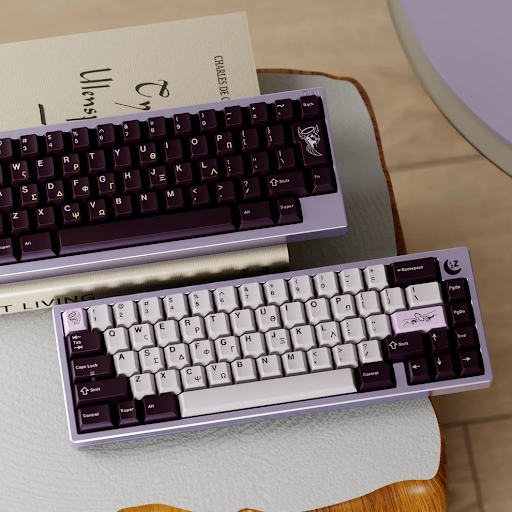
If you’re using a mechanical keyboard—or thinking about upgrading—one thing that makes a big difference in feel, sound, and aesthetics is your keycaps for mechanical keyboards. Keycaps might look like simple pieces of plastic, but they actually play a crucial role in typing comfort, acoustic performance, and personalization. In this guide, we’ll explain what keycaps are, why they matter, how to choose the right ones for you, and how to care for them so they last. By the end, you’ll be confident choosing keycaps that perfectly match your needs.
What Are Mechanical Keyboard Keycaps?
At its core, a keycap is the part of the keyboard you press with your finger—it’s the small cap that sits on top of a switch stem and contains the legend (letter or symbol). On mechanical keyboards, keycaps are usually made from durable plastics and designed to fit the common MXstyle cross stem found on Cherry MX and its clones (Gateron, Kailh, etc.). Most aftermarket sets are fully compatible with MX switches, though some low-profile or non-standard boards require special keycaps designed for them.
High-quality keycaps can improve not just aesthetics but also typing feel, sound profile, and longevity. Enthusiasts often swap keycaps to change the tactile feedback, customize the look of their setup, or reduce wear on frequently used keys.
Why Are Keycaps Important for Your Keyboard?
Keycaps matter in three major areas:
1. Typing Feel
Different materials and profiles (shape of the keycap) can affect how your fingers interact with the keyboard. For example, thicker, textured keycaps can feel more solid under your fingertips than thin, glossy ones.
2. Sound and Acoustics
Keycaps influence the sound your board makes. PBT keycaps tend to produce a deeper, muted tone, while certain ABS or polycarbonate keycaps can result in a higher-pitched sound. Tactile typists and gamers often develop strong preferences for the sound their preferred keycaps produce.
3. Longevity and Aesthetics
Cheap or low-quality keycaps can show shine (smooth, glossy wear) and faded legends after only a few months of use, while premium sets resist damage and keep their look longer. Stylish sets can also match your desk setup or personal aesthetic. Upgrading keycaps is one of the most cost-effective ways to personalize your keyboard experience without replacing the whole board.
What Are the Different Types of Keycaps?
Keycaps vary most significantly by material, legend method, and profile. Here’s a quick breakdown:
| Category | Common Options | What It Means |
| Material | ABS, PBT, POM, Polycarbonate | Determines feel, durability, finish |
| Legend Printing | Doubleshot, Dye-sublimated, Laser-engraved | Affects durability of letters/symbols |
| Profile | Cherry, OEM, SA, DSA, XDA | Affects height and typing feel |
Material Types
- ABS Plastic – Smooth, vibrant colors, often used in OEM sets; tends to wear and shine over time.
- PBT Plastic – More durable, textured surface prevents shine and extends life; popular in enthusiast sets.
- POM & Polycarbonate – Less common but unique feel (POM) and excellent light transmission for RGB (polycarbonate).
Legend & Printing Methods
- Doubleshot – Two-piece molding yields crisp legends that don’t fade.
- Dye-sublimated – Dye bonds permanently into the plastic, very durable.
- Laser-engraved – Cuts legend into surface; good for shine-through backlight sets.
Profiles Explained Briefly
- Cherry & OEM – Most common default profiles. Cherry is slightly lower and easier for long sessions.
- SA – Tall, sculpted profile with retro feel.
- DSA/XDA – Uniform height across rows, easier to swap keys.
How to Choose the Right Keycaps for Your Mechanical Keyboard?
Choosing the right keycaps depends on compatibility, use case, sound, style, and value:
1. Check Compatibility First
Make sure your keyboard supports the keycap set you want. Most mechanical boards use MX-style cross stems, but compact or low-profile boards may require specific keycaps. Always check the vendor’s compatibility details. (Keychron)
2. Decide Based on Your Use Case
- Typing & Work – PBT keycaps with Cherry profile provide comfort and durability.
- Gaming – Thicker keycaps in OEM profile for a solid, consistent feel.
3. Think About Sound Preferences
Keycap thickness and material affect acoustics. PBT or ABS doubleshot sets produce a deeper “thock,” while polycarbonate sets are brighter and ideal for RGB backlighting.
4. Choose Legends & Styles
For backlit keyboards, use shine-through legends. For custom aesthetics, dye-sublimated or doubleshot sets are best for long-lasting color and detail.
5. Value & Warranty
High-end sets often include novelty keys or alternate layouts. Always check verified buyer reviews for quality assurance. Ready to upgrade? Explore our keycaps for mechanical keyboards collection.
How to Maintain and Clean Your Keycaps?
Keeping keycaps clean extends their life and improves typing experience.
Routine Cleaning
- Wipe with a microfiber cloth to remove dust and oils.
- Use compressed air or a small brush to clean between keys.
Deep Cleaning
- Remove keycaps with a puller.
- Soak in warm, soapy water (avoid harsh detergents).
- Rinse and air dry completely before reinstalling.
Longevity Tips
- Avoid eating over your keyboard.
- Rotate frequently used keys if you have spares.
Conclusion
Keycaps are one of the most underrated upgrades for mechanical keyboards. They impact how your board feels, sounds, and looks. Whether you’re typing all day, gaming, or customizing your setup, choosing the right keycaps for mechanical keyboards can elevate your experience. By understanding materials, profiles, compatibility, and care, you’ll make better decisions and enjoy your keyboard more. Check out our keycaps for mechanical keyboards collection for durable, stylish options.
FAQs
What material is best for mechanical keyboard keycaps?
PBT is generally preferred for durability and resistance to shine, while ABS offers smooth feel and vibrant colors.
Can I mix and match keycaps from different brands?
Yes, as long as they’re MX-style compatible and match your keyboard layout sizes. Always check stem type and profile.
How often should I replace my keycaps?
With proper care, quality keycaps can last years. Replace them if legends fade, they feel worn, or you want a new look or feel.